ENRIC builds small, reliable tools for online stores — two Shopify apps and a browser extension — that each solve one job well, with clear pricing and the math shown.
Demand forecasting and reordering for Shopify. Per-variant and per-location forecasts, reorder dates and quantities, and purchase orders with the math shown.
Forecasts per variant and location, with a High, Medium or Low confidence level
Reorder dates that factor in supplier lead time and safety buffer
Purchase orders as a Shopify CSV, or emailed to your supplier (Growth and Pro)
A label program that runs in your browser, not a Shopify app. Type the data, import a spreadsheet, or take it from a Shopify, PrestaShop or WooCommerce product or order.
Works with or without an online store: by hand or from Excel and CSV
Your own templates, retail and GS1 barcodes, numbering, lot and expiry
Zebra, TSC, SATO and other thermal label printers, or any office laser or inkjet printer with A4 label sheets
Reversa works through Shopify webhooks and the Admin API, with no scripts, CSS or Liquid added to your theme. Larderia connects through the official Shopify API. Both are Shopify apps; PrinterTag is a browser extension.
We don't store customer names, emails or addresses
Reversa has no access to customers or orders. Larderia reads orders only for their line items — product, quantity, date and location — and never handles payment data. PrinterTag runs on your computer: your labels never touch our servers (with Pro, only the licence key is checked online).
Shopify apps billed through your Shopify invoice
Reversa and Larderia: prices in USD, charged by Shopify. Cancel anytime from Shopify. PrinterTag has its own prices, listed below.
14 days free on the Shopify apps' paid plans
Every paid plan of Reversa and Larderia starts with a 14-day free trial. Larderia also has a free plan, and PrinterTag is free up to 50 labels a month.
Database and servers in the EU
The database and servers of Reversa and Larderia are hosted in an EU region: Reversa on Fly.io, Larderia on Render in Frankfurt. Email delivery runs through a US provider under GDPR safeguards. PrinterTag keeps label data on your computer; its Pro licence server runs on Cloudflare under GDPR safeguards.
Unused days refunded
Cancel Reversa or Larderia part-way through a billing period and the unused days are refunded. Not satisfied? Your last payment is refunded if you ask within 30 days.
Reversa in detail
The undo button your catalog was missing.
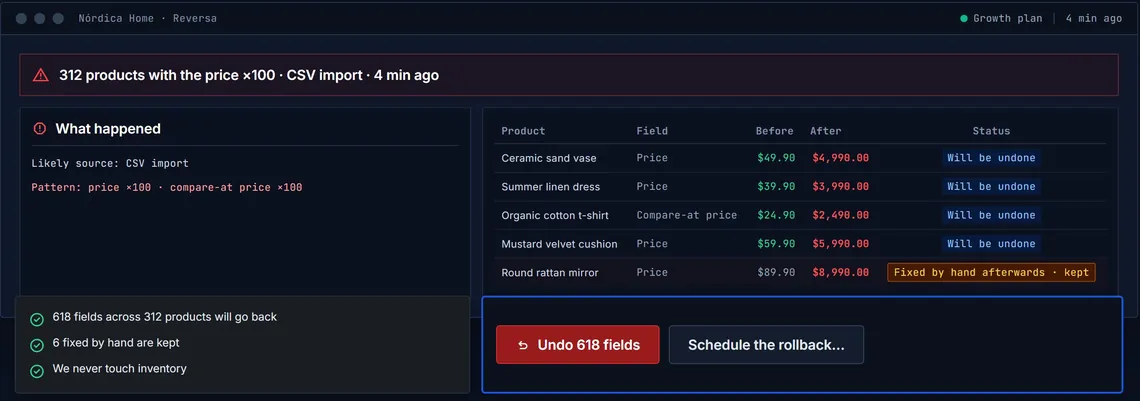
Bulk edits and CSV imports can't be undone in Shopify, and the activity log only lets you look. Reversa logs the catalog changes Shopify reports and reverses mistakes, keeping any manual fixes made since.
Field-by-field history
Before and after values for products, variants, prices, images, metafields and collections, with the likely source: an import, an app or an edit by hand.
One alert per event
When something anomalous happens, such as 50 products in 10 minutes or prices multiplied by 3 or more — by email or Slack.
Undo without overwriting
Before, after and now are compared for every field; anything fixed by hand afterwards is kept unless you choose otherwise.
Built for agencies
Every client store in one panel, three roles, your brand in the panel and alerts, scheduled undo and CSV review.
How it works
1
Records every change
Each change Shopify reports, field by field, with its before and after values and its likely source.
2
Alerts once per event
A single grouped alert for an import that touches hundreds of products, not one per product.
3
Undoes the event, a product or a field
A restore point is saved first. Later fixes made by hand are kept.
4
Checks every field
After undoing, Reversa reads the store again and compares every field.
What it protects
Undone
Prices and compare-at prices · title, description, tags, type, vendor and handle · variants · images · product status and sales channels · product metafields · automated collections
Recorded only
Manual collections · deleted products (not recreated) · inventory (stock changes with every sale: recorded, never reverted)
Not covered
Orders, customers, themes, pages, menus and redirects · videos and 3D models
Reversa vs. restoring a full backup
Restoring a backup rolls the entire store back to a past snapshot. Reversa reverses a single event and leaves the rest alone.
Reversa vs. restoring a full backup
What you need
Full backup
Reversa
Undo just one field, not the whole store
Backup: no
Reversa: yes
Keep fixes made after the mistake
Backup: no
Reversa: yes
See changes grouped under the import, app or edit behind them
Backup: no
Reversa: yes
Verify every field once it is undone
Backup: by hand
Reversa: yes
Illustrative example with made-up data · from getreversa.app
Coverage table, an incident walked through step by step, agency features, security and the full FAQ.
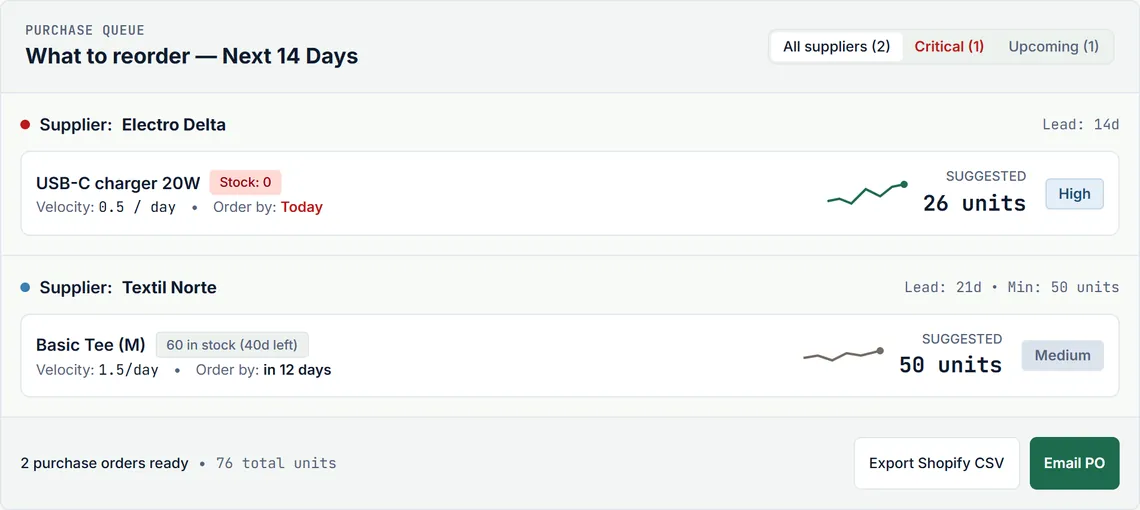
Static threshold alerts and 30-day averages ignore stock-outs, supplier lead times and seasonality. Larderia forecasts demand per variant and location, and suggests reorder dates and quantities — with the math shown.
Stock-outs aren't zero demand
Out-of-stock days are left out of the demand calculation, so a stock-out doesn't lower your next reorder.
Seasonality and trend
With 13 or more months of history, annual seasonality per variant; with less, trend and average-based models.
Rules per supplier
Lead time, minimum order, case pack multiple, days of coverage and safety stock, set per supplier.
Moving from Stocky
Import your exported Stocky purchase orders (Growth and Pro) and add each supplier once.
How it works
1
Reads your sales history
Order line items, quantities, dates and locations only, through the official Shopify API.
2
Forecasts each variant
Trend, seasonality and irregular demand per variant and location, with a High, Medium or Low confidence level.
3
Suggests what to order
Adjust the quantities, then export a CSV for Shopify Purchase Orders or email the PO PDF (Growth and Pro).
No black boxes
The suggested reorder, step by step:
(lead time + safety buffer + coverage cycle) × daily velocity = suggested units, rounded up
Forecasts are estimates drawn from your past sales; the ordering decision is yours.
Larderia after Stocky
Shopify's Stocky app stopped working on August 31, 2026. Shopify moved several of its tools into the admin, but not all of them.
Design and print any label, with or without a store.
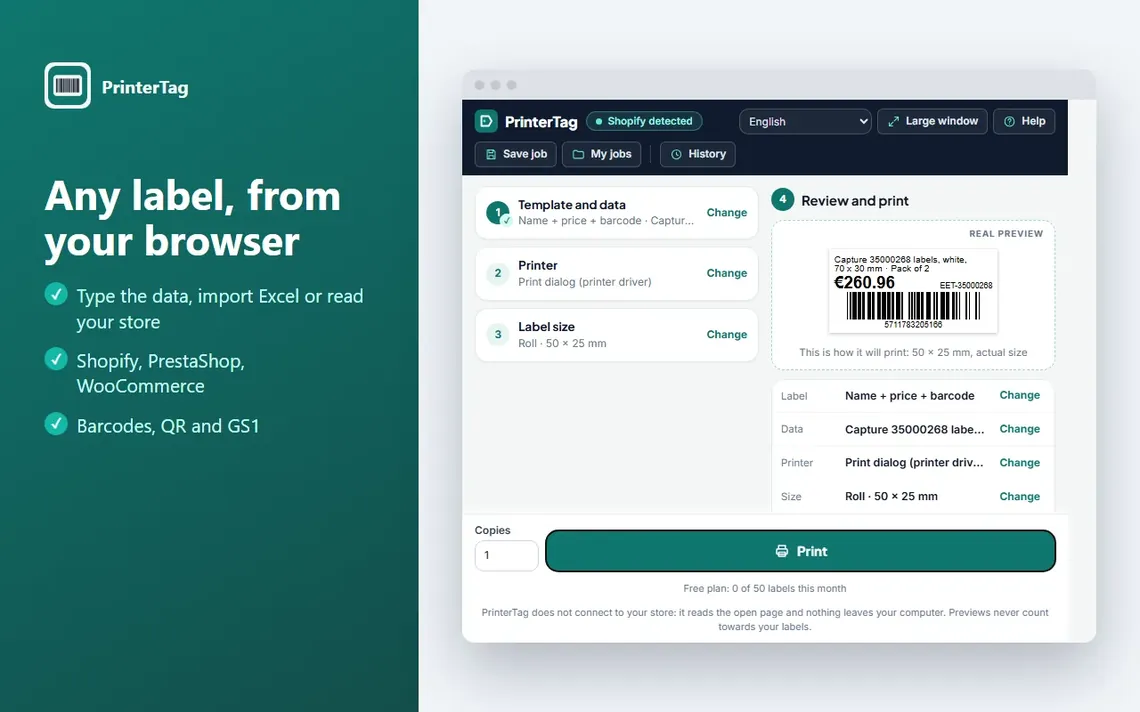
PrinterTag is an extension for Chrome, Microsoft Edge and Firefox, not a Shopify app. It works as a small label program: you type the data, import a spreadsheet, or let it pick up the product or order open in Shopify, PrestaShop or WooCommerce. You review the label and print.
Available on the Chrome Web Store, which also installs it in Microsoft Edge, and on Firefox Add-ons. Download links and guide on printertag.com.
PrinterTag with three products from a Shopify list · in 9 languages, with its website and help guide
Three ways to fill a label
By hand, from an Excel or CSV list, or straight from a store product, product list or order, variants included.
Templates of your own
Logo, fixed texts, sale badges and the data you choose, placed anywhere on the label as in BarTender, with zoom, millimetre rulers and a preview that matches the print.
Retail and logistics codes
EAN, UPC, ITF-14, Code 128, QR, DataMatrix and GS1 with lot and expiry. A wrong EAN check digit is flagged before printing.
Rolls or A4 sheets
Zebra, TSC, SATO and other thermal label printers, or any office laser or inkjet printer with A4 label sheets. Direct printing to Zebra with no driver settings, and a check that the printer is ready.
Numbering and stock
Sequential numbers, one label per unit in stock, price per kg or litre, and the old price struck through.
Private by design
Your labels and store data stay on your computer: no accounts or tracking; with Pro, only the licence key is checked online. Only printed labels count towards the free plan.
How it works
1
Bring in the data
Type it by hand, import a spreadsheet, or open a product or order in your store.
2
Click the extension icon
The first time, a short assistant sets up the printer and the label size.
3
Print
On a roll or an A4 sheet. The visual guide shows every screen if you need help.
Pricing
Flat prices, billed by Shopify.
Prices in USD. Reversa and Larderia are priced per month, as in the Shopify App Store, with no per-order fees and 14 days free on every paid plan. PrinterTag, a browser extension, has its own plans.
Shopify apps: billed through Shopify
Shopify apps: 14 days free on paid plans
Shopify apps: no per-order fees
Shopify apps: cancel anytime, unused days refunded
PrinterTag: free up to 50 labels a month, no card
Reversa
Change history and undo for Shopify catalogs.
Per connected store
Starter
$29/ store / month
Up to 1,000 products
90 days of history
Every feature included
Growth
Recommended for agencies
$49/ store / month
Up to 10,000 products
180 days of history
Every feature included
Pro
$99/ store / month
Up to 50,000 products
365 days of history
Every feature included
All features come with every plan, and the 14 free days start when you pick one. There is no free plan. Agencies: free agency panel, 20% off from 5 stores and 30% off from 15 stores.
Label printing in the browser, with or without a store.
Browser extension
Free
$0/ month
50 labels a month
All templates and printers
No account, no card
Pro
$9.99/ month
$79 / year
Unlimited labels
All templates and printers
Email support
Pro: €9.99 a month or €79 a year in the euro area, $9.99 or $79 elsewhere, plus taxes, paid securely through Stripe. The extension is available on the Chrome Web Store and Firefox Add-ons.
About ENRIC and its three products. Each product's site has its own, more detailed FAQ.
Who is behind ENRIC?
ENRIC is one independent developer based in Spain who builds and supports every product personally, and answers every email to hello@enric.app.
How am I billed?
Reversa and Larderia: through your Shopify invoice, with prices set in US dollars. Reversa is priced per connected store ($29, $49 or $99 a month depending on the number of products). Larderia has a fixed monthly price that does not depend on your sales ($0, $12, $19 or $29), with a yearly option. Neither charges per-order fees. PrinterTag has its own plans: free up to 50 labels a month, or Pro with unlimited labels at €9.99 a month or €79 a year in the euro area ($9.99 or $79 elsewhere), plus taxes, paid through Stripe.
Is there a free trial or a free plan?
Every paid plan of Reversa and Larderia starts with 14 days free. Reversa has no free plan: it starts recording once you approve a plan. Larderia has a free plan for up to 100 active variants. PrinterTag is free up to 50 labels a month, with every feature, no account and no card.
Can I cancel? Do you offer refunds?
Yes to both for Reversa and Larderia: they can be cancelled anytime from Shopify. If you cancel part-way through a billing period, the unused days of that period are refunded; days already used are not. Not satisfied? Your last payment is refunded if you ask within 30 days (once per store in any 12-month period). Shopify handles the charge and we issue the refund through Shopify. PrinterTag can be cancelled any time.
What data do the apps and the extension read?
Reversa reads the catalog only: products, collections, sales channels and inventory (read-only), with no access to customers or orders. Larderia reads orders only for their line items — product, quantity, date and location — and writes stock only when you receive a purchase order in the app. PrinterTag reads the page only when you click its icon and draws the label on your computer; nothing leaves it. None of the three stores customer names, emails or addresses.
Where is the data stored?
The database and servers of Reversa and Larderia are in an EU region: Reversa on Fly.io, Larderia on Render in Frankfurt, Germany. PrinterTag keeps your labels and store data on your computer; only PrinterTag Pro stores the purchase email and licence key on a licence server (Cloudflare), as its privacy policy explains. Some providers are US companies working under GDPR safeguards: emails sent by the apps go through Resend, which stores their content in the United States. Reversa and Larderia delete a store's data after Shopify confirms the uninstall, within 30 days at most (the privacy policy of each app gives the backup timing).
What is PrinterTag, and can I install it yet?
PrinterTag is an extension for Chrome, Microsoft Edge and Firefox, not a Shopify app. It works as a label program: price, barcode and shipping labels typed by hand, imported from Excel or CSV, or taken from Shopify, PrestaShop and WooCommerce products and orders, on thermal printers and A4 sheets. It is available on the Chrome Web Store (it also installs in Microsoft Edge from there) and on Firefox Add-ons; links and guide on printertag.com. The extension, its website and its help guide are in 9 languages.
How do I get support?
There is one email for everything: hello@enric.app (PrinterTag also answers at hello@printertag.com). If you already use Reversa, the "Contact support" button inside the app is faster, because it attaches the technical context needed. Larderia's Pro plan includes priority support.
About
ENRIC is an independent software studio based in Spain, building apps and tools for merchants worldwide.
One person builds and runs every product, and answers every email.